
Netgear Range Extender EX2700: Setup Guide, Benefits & FAQs
Posted by WifiExtSetup on 27th August 2025
Introduction: Is Your WiFi Failing You?
Have you ever sat in a corner of your house where the WiFi signal simply gives up? Maybe your favorite streaming spot becomes a buffering nightmare, or your video calls keep dropping at the worst time. Isn’t it frustrating when your internet feels like it has limits inside your own home?
This is where the Netgear Range Extender EX2700 steps in. It’s designed to eliminate dead zones and provide you with seamless coverage throughout your space. But what makes it stand out? How do you set it up quickly without technical headaches? Let’s dive in.
“A stable WiFi connection is not a luxury anymore—it’s a necessity.”
What is the Netgear Range Extender EX2700?
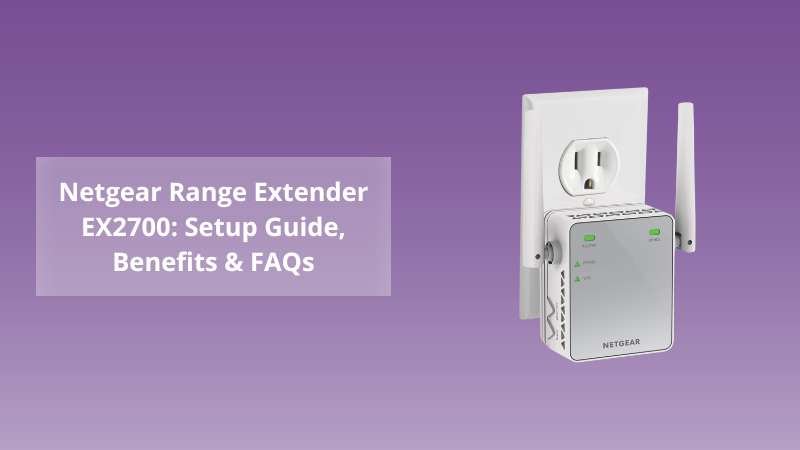
The Netgear EX2700 is a compact, plug-in WiFi range extender built to expand your router’s coverage. Supporting up to 300 Mbps WiFi speed and featuring external antennas, it ensures stronger connections for devices like smartphones, laptops, and smart TVs.
Think of it as a bridge—when your router struggles to reach far rooms or multiple floors, the EX2700 picks up the existing WiFi signal and amplifies it, so your entire space gets consistent coverage.
Step-by-Step Setup Guide for Netgear EX2700
Setting up the EX2700 is simple, even if you’re not tech-savvy. You can use either WPS (WiFi Protected Setup) or the Web Browser Method.
1. WPS Method (Quick Setup)
-
Plug the EX2700 into a power outlet near your router.
-
Wait for the Power LED to turn solid green.
-
Press the WPS button on your router.
-
Within 2 minutes, press the WPS button on the extender.
-
Once the Link LED turns green, your extender is successfully connected.
2. Web Browser Setup
-
Plug in the extender and connect your device to the NETGEAR_EXT WiFi network.
-
Open a browser and visit www.mywifiext.net.
-
Follow the on-screen instructions to connect the EX2700 to your home WiFi network.
-
Place the extender midway between your router and the WiFi dead zone.
👉 Need more setup guidance? Check out our blog on Netgear Range Extender AC2200: Setup Guide, Benefits & Expert Tips
Key Benefits of Using Netgear EX2700
-
Eliminates Dead Zones: Perfect for extending coverage to upstairs rooms, basements, or garages.
-
Simple Plug-and-Play Design: No bulky equipment—just plug it into any wall outlet.
-
Reliable Speed: Up to 300 Mbps, ideal for browsing, streaming, and light gaming.
-
Universal Compatibility: Works with any standard WiFi router.
-
Secure Connection: WPA/WPA2 encryption keeps your network safe.
“Think of it as giving your WiFi superpowers—it extends its reach and keeps you connected everywhere.”
Pro Tips for Best Performance
-
Place the extender midway between your router and the weak signal area.
-
Avoid plugging it in near microwaves, cordless phones, or thick walls, as these interfere with WiFi signals.
-
Use the Netgear WiFi Analytics app to check the best spot for maximum coverage.
Common Issues & Troubleshooting
-
Can’t connect to mywifiext.net? Try entering 192.168.1.250 in your browser.
-
Weak signal after setup? Reposition the extender closer to your router.
-
Forgot admin credentials? Perform a factory reset by holding the Reset button for 10 seconds.
Conclusion: Is the Netgear EX2700 Right for You?
So, is the Netgear EX2700 the solution to your WiFi struggles? If you’re tired of weak signals, buffering videos, or failed connections, the answer is yes.
It’s simple to install, budget-friendly, and highly effective for smaller to medium-sized homes. While it may not offer blazing speeds like newer dual-band models, it’s a solid choice if your main goal is consistent coverage.
At the end of the day, it’s about making your digital life smoother. No more WiFi dead zones. No more frustration. Just seamless connectivity wherever you need it.
“Why settle for less when uninterrupted WiFi is just a plug away?”
FAQs on Netgear Range Extender EX2700
Q1. Can I use the EX2700 with any router?
Yes, it is compatible with all standard WiFi routers and gateways.
Q2. Does the EX2700 support dual-band WiFi?
No, it supports single-band (2.4 GHz) with speeds up to 300 Mbps.
Q3. How many devices can connect to the EX2700?
It supports multiple devices, but performance may be reduced if too many are connected at once.
Q4. What is the coverage area of the EX2700?
It can extend coverage up to 600–800 sq. ft., depending on your home layout.
Q5. How do I reset the EX2700?
Press and hold the Reset button for about 10 seconds until the power LED blinks.